Setting up subdomain delegation in SafeDNS
This is a guide for using SafeDNS to setup subdomain delegation. If you do not have access to any of the features please speak to the support team to get them enabled.
Login to the ANS Glass and browse to SafeDNS.
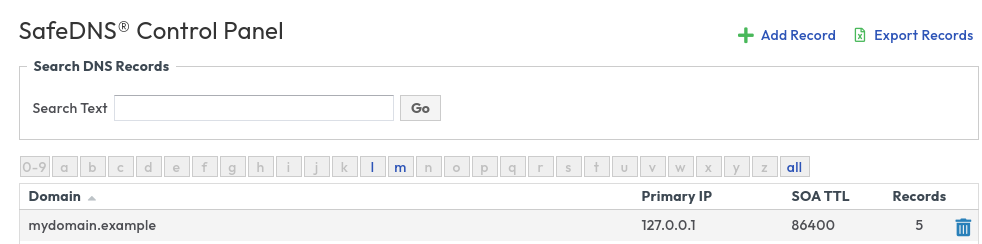
Note your domain mydomain.example
Now click on + Add Record and add a new zone called subdomain.mydomain.example This will be your new delegated zone.
Once this is created you can click on mydomain.example and you will see two new records.
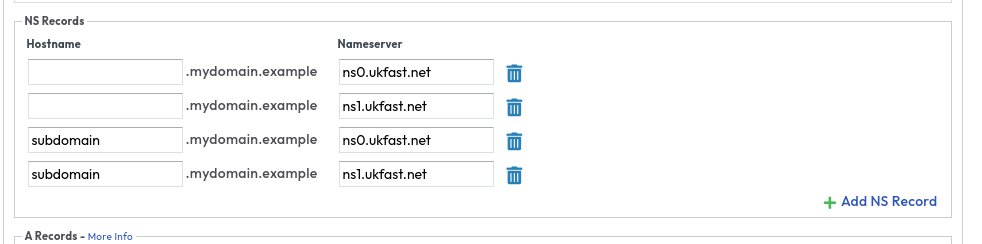
You can now manage your zone and records for subdomain.mydomain.example in the new zone you just created.
Now go back to the zone list and manage your new zone subdomain.mydomain.example by selecting it.
Any changes you make for subdomain.mydomain.example in the mydomain.example zone will be ignored.
Setting up subdomain delegation with for an external provider
To manage your new subdomain with an external provider make sure you add NS records in the mydomain.example zone for subdomain.mydomain.example as above, however you will need to ensure that any new zones for subdomain.mydomain.example are removed from SafeDNS otherwise SafeDNS will respond to the external DNS queries.