



By Donny Walsh, Enterprise Architect at ANS
One of the big advantages of Azure Virtual Desktop is flexibility. Organisations can provide desktops and applications to users without maintaining traditional desktop infrastructure in every office.
But that flexibility can also introduce a challenge:
How do you keep Azure costs down when using AVD?
A common mistake is to deploy enough Azure Virtual Desktop session hosts to cope with the busiest part of the working day and then leave those machines running all the time.
The problem is that your busiest hour is probably not representative of your entire day.
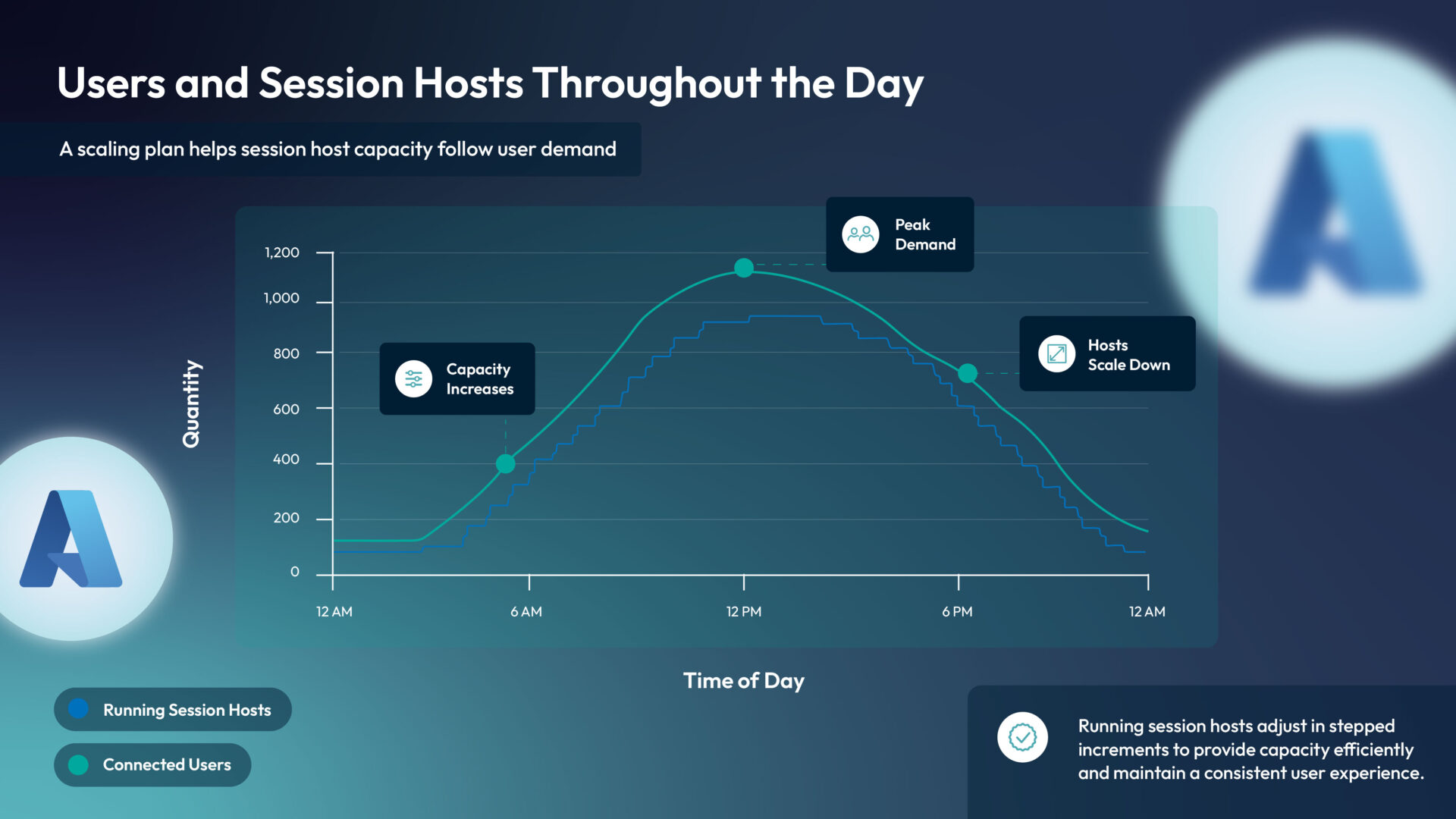
At 10:00am you might have 300 people connected.
At 7:00pm you might have 20.
At 2:00am you most likely have nobody.
If the same AVD capacity is running throughout all three periods, you may be paying for computing power that nobody is using.
This is where AVD Scaling Plans can make a significant difference.
The advantage of cloud environment flexibility
When looking at Azure Virtual Desktop costs, session host virtual machines are usually one of the biggest areas of consumption. Microsoft itself recommends autoscaling as one of the ways organisations can reduce AVD compute costs by matching capacity to demand.
Think of it like running an office building.
You probably wouldn’t keep every meeting room, light, air-conditioning unit and workstation operating at maximum capacity 24 hours a day just because the office becomes busy between 9am and 5pm.
Yet cloud environments can sometimes end up operating exactly like that.
The financial benefit of cloud comes partly from being able to change the amount of infrastructure you consume.
Scaling plans help AVD take advantage of that flexibility.
What is an AVD scaling plan?
At a high level, a scaling plan tells Azure Virtual Desktop:
When do I need capacity, how much do I need, and when can I reduce it?
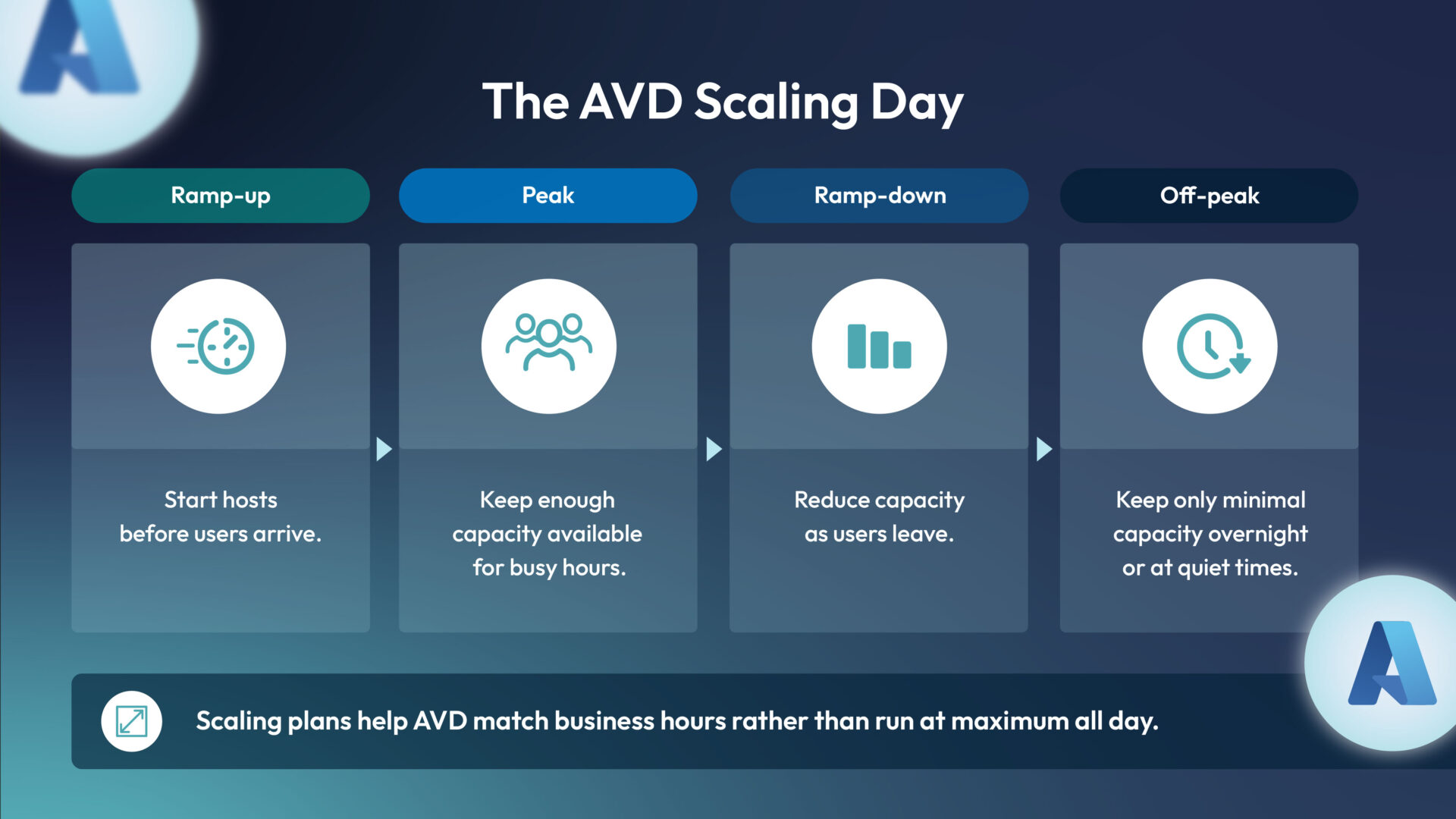
A typical working day can be thought of as four phases:
Ramp-up → Peak → Ramp-down → Off-peak
Microsoft uses these same phases within AVD autoscaling.
Ramp-up
Before employees begin work, AVD starts enough session hosts to handle people logging in.
Rather than waiting until hundreds of people arrive at 9:00am, capacity can begin coming online beforehand.
Peak
During the busiest part of the day, enough session hosts remain available to support demand.
If more capacity is required, additional hosts can be made available.
Ramp-down
As people finish work, AVD can begin consolidating users onto fewer session hosts.
Machines that are no longer required can then be deallocated.
Off-peak
During evenings, nights or weekends, the environment can operate with significantly fewer machines.
For some environments, this could mean keeping only minimal capacity running.
The concept is straightforward:
More users = more capacity.
Fewer users = less capacity.
Better scaling, lower costs
The important change in thinking is this:
AVD shouldn’t necessarily be designed as an always-on infrastructure platform.
Traditional infrastructure was often sized for peak demand because the servers had already been purchased.
Azure changes that model.
If you need 20 session hosts during the busiest part of the day but only four during quieter periods, there may be little benefit in paying for all 20 throughout the evening.
Microsoft’s native auto scale capability can start and deallocate session host VMs according to the scaling plan, helping align the amount of compute running with actual demand.
When a VM is correctly deallocated, Azure no longer charges for its compute resources, although associated resources such as disks can continue to generate charges.
So scaling isn’t about eliminating every AVD cost.
It’s about avoiding unnecessary compute cost.
Imagine an organisation has an AVD environment designed for 500 users.
During the day it may need:
Morning: 6 session hosts
Peak: 20 session hosts
Late afternoon: 12 session hosts
Evening: 4 session hosts
Overnight: Minimal capacity
Without scaling, the organisation might leave all 20 session hosts running continuously.
With a scaling plan, the environment can gradually increase capacity as users arrive and reduce it as they leave.
Across hundreds of virtual machines and thousands of operating hours each year, reducing unnecessary runtime can become a meaningful cost optimisation exercise.
The practical guidance you need
You don’t necessarily need to understand every technical AVD setting to start a useful conversation about scaling.
I would begin with six considerations.
1. Understand when people use AVD
Look at real usage rather than assumptions.
When do users normally log in?
When does usage peak?
How many people are connected during evenings and weekends?
Different user populations may also need different approaches.
2. Don’t design everything around peak demand
You need enough capacity to handle your busiest periods.
That doesn’t mean all that capacity needs to run permanently.
Think about minimum, normal and peak capacity rather than one fixed number.
3. Create different schedules where appropriate
Monday morning may look very different from Saturday afternoon.
AVD scaling plans can contain different schedules, allowing organisations to account for different working patterns.
This can be especially useful for organisations with predictable office hours.
4. Protect the user experience
Cost optimisation shouldn’t mean making users wait for desktops.
Always retain enough capacity to handle expected demand and allow some headroom for unexpected usage.
The aim isn’t:
Run as few machines as possible.
It is:
Run the right number of machines at the right time.
5. Review the results
A scaling plan shouldn’t be configured once and forgotten.
Review:
- Number of active users
- Session host utilisation
- Login patterns
- Peak periods
- Azure costs
- User experience
You may discover that a host pool configured to ramp up at 6:00am doesn’t really become busy until 8:30am.
That is another optimisation opportunity.
6. Combine scaling with wider cost optimisation
Scaling plans are only one part of AVD cost management.
Also consider:
- Correct VM sizing
- User density per session host
- Storage configuration
- Savings Plans or Reserved Instances where suitable
- Azure Cost Management budgets and alerts
- Regular review of unused resources
Microsoft’s Well-Architected guidance recommends combining appropriate VM sizing, scaling plans and ongoing cost management rather than treating any one of them as the complete solution.
Rounding up
AVD cost optimisation doesn’t always require a major redesign.
Sometimes one of the biggest opportunities is simply making sure infrastructure isn’t running when nobody needs it.
Scaling plans allow organisations to align AVD capacity more closely with the way employees actually work.
Ramp up when users arrive.
Provide capacity during busy periods.
Ramp down when demand falls.
Reduce unnecessary infrastructure overnight.
The technology behind it can become sophisticated, but the business principle is extremely simple:
Don’t pay for 24 hours of peak AVD capacity when your users only need it for part of the day.
Start with your usage patterns, introduce scaling conservatively, monitor the results and refine the configuration over time.
A well-designed AVD environment isn’t necessarily the one with the most resources. It’s the one that has the right resources available at the right time.
Ready to put this advice into practice? Talk to ANS about managing your Azure Virtual Desktop environment in line with Microsoft best practices. Our AVD Managed Service can help you address performance, security and disaster recovery, while keeping costs under control.